

No time to optimize your website, but want to show up in Google/Bing? Here’s a list of impactful search engine optimization tasks you can complete in 20 minutes or less!
You can make that happen by breaking down big tasks into smaller ones and completing them in 20-minute increments.
Download the Quick SEO Tasks Checklist to reference while you work!

Tips:
- The most important thing about SEO is not which keywords you’re using, but how helpful your website is to your audience.
- Progress is enough. Don’t feel the need to finish all of the tasks for a whole page or a whole section at a time. Appreciate what you’ve completed and know that you’re moving forward.
- Save your old content before making changes so you can compare them later to understand what worked best.
- If you don’t want to make live edits on your website, pull content into a doc and make changes there before uploading.
I’ve outlined the process below accompanied by the amount of time needed for each item.
Keyword Research & Topic Ideas
Time: 20 minutes/topic or page
Understanding your audience is half the battle. Try to answer these questions about prospective customers before using any research tools:
- What words do you think they use when they search?
- What are their challenges?
- What are their goals?
- Where do you think they spend time online?
Make note of these words and phrases so you can create or optimize content for your audience. Collect these in a doc or notebook.
How to Find Keywords

- Brainstorm
- Review competitor websites
- Keyword research tools
Keep in mind that the most important part of this exercise is to understand what your audience needs and how you can provide that information.
When you get that list together, move on to using keyword tools.
Free Keyword Research Tools
This keyword research tool can help you understand how people search for your services or products.

Keyword Research Tips
- Look for High Volume and Low Search Difficulty (SD) keywords. This will give your page a better chance of ranking in search for that keyword/topic.
- High Volume means there are a lot of people searching for that keyword.
- Low SD means there isn’t much competition for that keyword.
- Click the Questions tab for questions people ask related to your topic keyword!
- Try to answer those questions (if they’re relevant).
Set up Search Console.
These keywords are already bringing users to your website via Google Search. Go to the Performance report to find them.

You won’t be able to see search volume or competition in this report, but you’ll be able to see which searches your website is already showing up for. Keep an eye out for:
- High impressions and low clicks
- Low Position and moderate impressions
Audience Research
Time: 20 minutes/audience
Now that you understand your audience’s needs, you need to figure out where your audience gets their information and what types of information they’re reading.
You can start by listing out a few sources you think they might be reading such as websites, blog posts, YouTube/Vimeo Channels, magazines, etc.
Audience Research Tool
This type of research was super time-consuming a couple of years ago. Sparktoro has saved me so much time that I can’t recommend it enough!
Sparktoro is a freemium tool that shows the websites your customers visit, social accounts they follow, hashtags they use, and more. If you sign up for the paid version, you get to see podcasts, Subreddits, YouTube Channels, etc.

Make notes of all of these! You can click into each one (without increasing your free searches) to learn more about that source.
You might find useful keywords or topics in here as well, so keep an eye out.
I like to copy everything into a spreadsheet so I can dig in deeper later.
These lists will help you determine what types of content are interesting to your customers. You can use that to write better pages or make better videos.
Title Tag & Meta Description Updates
Time: 5 minutes/page
You’ve all seen title tags & meta descriptions whether you realize it or not. These are parts of a page that show up when you’re searching in Google or another search engine.

Optimizing these elements is easy if you think of this combo as a mini ad for your page.
Answer these questions:
- What do people want to know about this page?
- What are my keywords for this page?
Use these character limits for the best results:
- Title tags should be 60 characters or less
- Meta descriptions should be 155 characters or less
If your website editor doesn’t show you the number of characters in those fields, you can use a character counter.
Title tags and meta descriptions should always be unique to that page. Try to make them as helpful to your readers as possible.
Tip: Test different combinations to see if you can increase your Click-Through Rate (CTR).
Add Page Formatting
Time: 15 minutes/page
Headlines, subheadlines, lists, etc., make it easier for people to quickly understand your content and find answers.
People want to skim, not read.
- Keep paragraphs short
- Use headlines and sub-headlines
- Insert lists where applicable
- Add images, videos
- Bold, underline, or italicize text for emphasis
Make URLs Comprehensive
Time: 15 minutes
URL should make sense to people.
For example:
example.com/puppies-adorably-confused-by-rainbow
makes more sense than
example.com/391nfns2o53226-
People are more likely to click on that first URL.
Make sure your URLs:
- Contains targeted keywords
- Use hyphens for spaces
- Use appropriate keywords
Add Internal Links
Time: 10 minutes/page
This might be my favorite tip! Add links to useful content on your site.
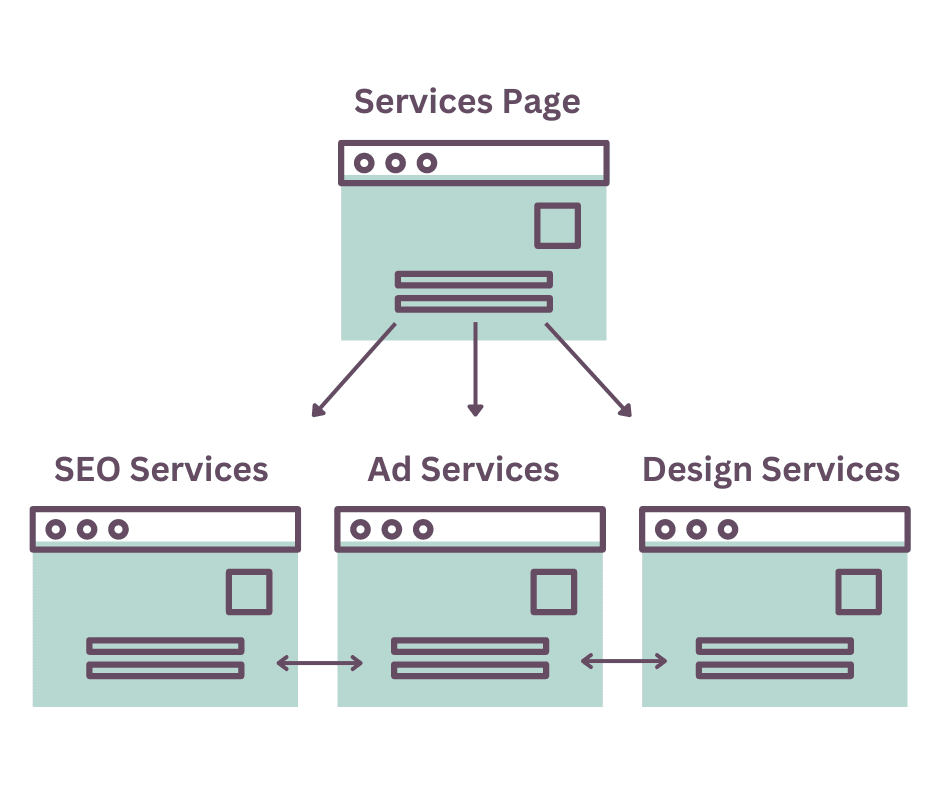
I link all of my services pages together because they tend to work well as a unit. If someone is interested in advertising, they likely need a designer as well. The same goes for SEO services.
When you’re writing a blog post, adding a link to another internal page within the text will make it easier for people to find the information they need. This is useful when linking to case studies, other blog posts, services/product pages, etc.
Internal links aren’t only helpful for people. They also point search engines toward related pages on your website. It’s a common understanding in the SEO world that links from other domains are more useful, but don’t underestimate the value of this tactic. Cyrus Shepard did a study on the significance of internal links if you want to learn more about them.
Add Keywords to Image Alt Text
Time: 10 minutes
Alternative text, or alt text, helps:
- images appear in Google Image Search
- search engines better understand the content on your page
Write helpful alt text that uses keywords and is relevant to the content of the page.

There are plenty of tasks you can complete in a short period of time to improve your content and rank higher in search results. Remember that having a website that is helpful to your audience is superior to having the right keywords. Don’t forget to download the checklist!

Megan Pritts
Megan is a seasoned digital marketing consultant with a knack for transforming online presences. With an extensive background in SEO, SEM and graphic design, she has helped local small businesses to Fortune 100 companies across various industries grow their online presence. Her expertise lies in building custom marketing strategies that don’t just improve traffic, but also result in quality leads and sales.